


Radio Code Generator Unlocker
4.113.00 Reviews
App Specs
- Version
- 1.0.6
- Updated On
- License
- Free
- Downloads
- 100,000+
- Developer
- ARD WEB DEVELOPMENT
- Categories
- Auto & Vehicles
- Platform
- Android
Screenshots
 Analysis by AppCompare
A locked car stereo is an awkward problem: the car may be fine to drive, but a routine battery change or other interruption can leave the radio asking for a code you no longer have. Radio Code Generator Unlocker is aimed at that specific moment, helping drivers try to retrieve the code using details associated with the radio. I find the idea practical, but it is worth approaching the app as a focused tool rather than a guarantee: the result depends on whether the information you enter matches a radio the service can handle.
Clear enough to use when you are already frustrated
Radio codes are not an everyday task, so a useful app needs to make the first steps understandable without asking users to learn car-audio terminology. In my experience, the straightforward layout helps with that. You can concentrate on the details the process needs instead of navigating a complicated set of menus. That matters if you are standing beside a car, trying to get the stereo working before a commute or a long drive.
The developer, ARD WEB DEVELOPMENT, presents the app as a radio-code utility within the auto-and-vehicle category. Its 4.1 average from around 3,200 ratings and more than 100,000 installs suggest that many drivers have tried it, though those figures cannot tell you whether your particular stereo will be supported. I would treat them as a sign of interest, not as a promise that every code request will succeed.
Making the process easier to follow
The practical challenge is often not typing into the app; it is identifying the right radio information in the first place. Before starting, I would check the stereo’s markings and the vehicle paperwork, then compare those details carefully with what the app asks for. A serial number copied from the wrong label can send you down the wrong path. Taking a clear photo of the radio label before putting everything back together can also prevent a second round of searching.
This is one place where the app’s guided approach can help people who do not regularly work on cars. Still, a guide cannot make every stereo equally easy to inspect. Some radios are simple to access, while others may require careful removal. If reaching the serial number involves tools, unfamiliar trim or uncertainty about how the unit is fitted, I would stop rather than risk damaging the dashboard; a qualified car-audio technician is the more sensible option then.
Using it in different situations
The clearest use case is a radio that has started requesting a code after the car’s power was interrupted. Imagine discovering the prompt in a supermarket car park, with a drive home ahead of you. The app gives you a way to work through the information-gathering step on your phone instead of immediately searching through old papers or making an appointment. I would still wait until the car is safely parked before handling the phone or checking the stereo.
It can also suit someone helping a family member with an older vehicle, especially if the owner has misplaced the radio card or manual. In that case, agree on the exact stereo details before submitting anything, and keep the owner involved if the radio or dashboard needs to be accessed. The tool is less useful if the stereo is not asking for a code, if you do not have the relevant identification, or if the unit is an aftermarket model that does not fit the app’s process.
Worth Reading Before You Choose

Flipboard Shows What News Apps Must Do Beyond the Feed

Switching to Android Auto Means Rethinking Your Driving Routine

Google Calendar Makes a Crowded Week Easier to Manage

Ludo King Makes the Most of the Minutes Between Plans

Baby Panda World Brings Quick Play to Modern Phones, but Its Game Library Feels Busy

ESPN’s Live Game View Makes Following Close Games Easier
Motor, sight and attention all matter
A focused interface can reduce the effort involved in entering a code, but the task still asks you to read small labels, move between the car and your phone, and type information accurately. If close-up text is difficult to see, use a well-lit, stationary setting and enlarge the label with your phone camera before entering it. If repeated tapping or holding a phone is uncomfortable, gather the details first and complete the entry in one deliberate session rather than trying to work while moving around the vehicle.
For drivers with hearing differences, the core job is visual and text-based: identifying the radio and entering information, rather than relying on listening to instructions. However, a successful unlock is ultimately easiest to check through the stereo’s response, so someone who cannot hear that response may want a companion to confirm it or use the radio’s visible display. I would not treat the app as a substitute for accessible controls built into the vehicle itself.
Getting Started with Radio Code Generator Unlocker
First off, downloading and installing the app was a breeze. It's available for both Android and iOS, so no one gets left out. Once installed, the interface is clean and straightforward. The design isn’t going to win any awards, but it gets the job done. It’s intuitive enough that I didn’t need to hunt for a tutorial or manual. Just open the app, and you're ready to dive in.
The Process of Unlocking
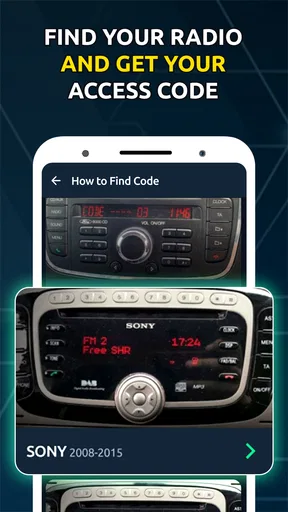
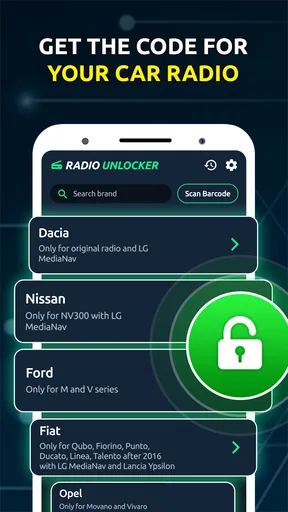
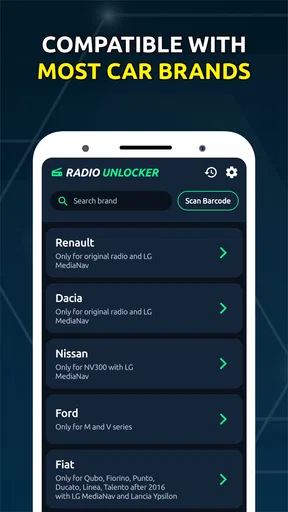
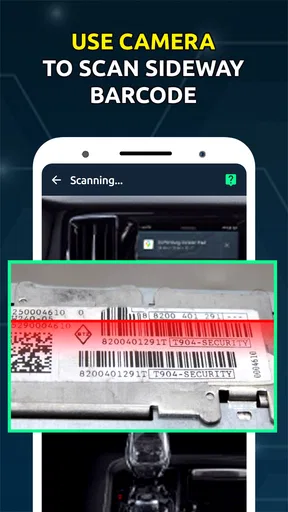
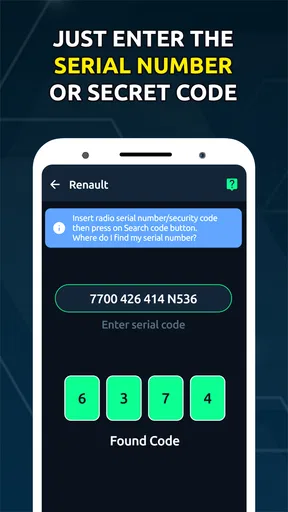
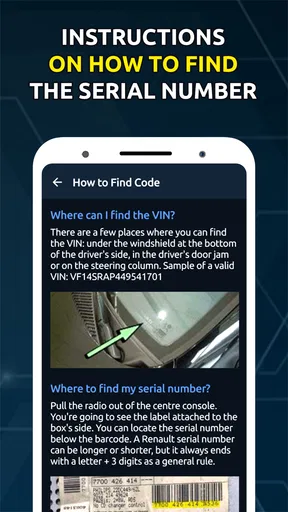
Using the Radio Code Generator Unlocker is surprisingly simple. You just need to input your car's make and model, along with the serial number of the radio. If you're like me and have no clue where to find these details, don't worry. The app provides a handy guide on locating the serial number, complete with diagrams. This part felt a bit like a treasure hunt, but once you've gathered your info, it's smooth sailing.
That simple flow is most helpful when you have the correct identifier ready; it is not a shortcut around the identification step. I would write the serial down exactly as shown, keeping letters and digits distinct, then review it once before requesting a code. A rushed entry can look plausible while still being wrong. If you are unsure whether a character is a zero or the letter O, compare it with the rest of the label rather than guessing.
There is a useful trade-off here. A dealership or specialist may be able to identify the stereo with help from the vehicle, but that can mean arranging a visit; searching old documents costs nothing but can become a hunt of its own. This app is the more convenient first try when you have the radio’s identifying details and want to handle the request yourself. If the details are missing, inconsistent or hard to access, asking a professional is a better use of time than repeatedly submitting guesses.
Performance and Reliability
Now, onto the most crucial part: does it actually work? I was skeptical, but within minutes of entering my details, the app generated a code for my radio. I punched it in, and voila! The sweet sound of music filled the car. It's like having a tech-savvy friend on call. The app promises a high success rate, and from my experience, it delivers.
My result was a positive one, but I would not extend that experience into a guarantee for every make, model or radio. If a code is rejected, pause before trying another entry. Recheck the serial and vehicle details, and make sure you are following the stereo’s own code-entry procedure. Repeated incorrect attempts may create more delay or frustration, so the sensible next step after checking your information is to contact a qualified source rather than cycling through variations.
It is also worth separating two questions: whether the app can produce a code and whether that code belongs to the exact radio in your dashboard. A stereo may have been replaced during the car’s life, so the vehicle’s original paperwork might not describe the unit currently installed. In that situation, the radio’s own identification is especially important. This is a small but meaningful check that can save time before you begin.
The app doesn’t just stop at providing a code. It also includes additional features like saving your code for future reference and a history log of all the codes you've generated. This is a lifesaver for those of us with a memory like a sieve.
Those records are most useful if you keep them organized. I would label a saved code with the car or radio it belongs to, especially if you help more than one person, and store the identifying details alongside it in a secure place. A history log is convenient, but it can become confusing if several vehicles are involved and the entries are not easy to distinguish. Treat the code like a key to a device you own: keep it available to the owner, not casually exposed to other people.
For someone who manages a household car, this can turn a one-off recovery into a less stressful future task. For a person who changes vehicles often, the same history feature is only helpful if old entries are clearly matched to their radios. I would not rely on memory alone or assume that a code saved for one stereo applies to another, even if the vehicles are similar.
Cost, expectations and alternatives
While the Radio Code Generator Unlocker isn’t free, it's reasonably priced considering the convenience it offers. Think about it: a one-time fee versus the hassle and potential expense of visiting a dealership. It's a no-brainer if you ask me.
In practice, the app is free to install, with optional in-app purchases listed from $2.49 to $4.99 per item. I would check what a purchase covers before paying, and first make sure the radio details are accurate. That is a better approach than treating payment as a guarantee of a working code. The app is rated for Everyone, and it runs on Android 8.0 or later; its current version is 1.0.6. Those details make it accessible to many phone owners, but they do not remove the need to confirm compatibility with the stereo.
Compared with the usual alternatives, the main benefit is convenience: you can try a phone-based route before arranging help from a dealer or car-audio shop. Looking through the owner’s manual, a code card or service paperwork is still the best first step if you have those items, because it may provide the original code without a separate request. A specialist is preferable when the radio has been changed, its serial label is difficult to reach, or the app’s result does not work. I see this app as a useful middle option, not a replacement for every source of support.
Who should skip it? Drivers whose radio does not request a code have little reason to install a dedicated unlock tool. It is also a poor fit for anyone who cannot identify the stereo safely, expects a code without providing the correct details, or needs hands-on help with the dashboard. For those users, a technician or the vehicle’s documentation is more appropriate than pushing through an uncertain process on a phone.
There’s also a solid support system in place. I had a minor hiccup with the code retrieval, and the customer service team was quick to respond and resolve the issue. That's always a plus in my book.
That experience is reassuring when a request does not go smoothly, though I would still prepare a concise support message: include the radio’s exact identifying information and describe what happened, without sharing unrelated personal details. Clear information makes it easier to explain the problem. If you are assisting someone else, get their permission before sending information connected to their vehicle.
One remaining barrier is that a phone app cannot make an awkward physical task disappear. Finding a label may involve poor lighting, a cramped footwell or a radio that is difficult to remove. I would not attempt that work while parked somewhere unsafe or while distracted by traffic. If you have limited reach, dexterity or vision, ask someone you trust to help with the inspection, or choose a professional who can handle the stereo directly. The most inclusive workflow is not always the one that insists you do every step alone.
Final Thoughts
In a world where convenience is king, the Radio Code Generator Unlocker stands out as a must-have tool for anyone who’s ever been locked out of their car radio. It’s easy to use, reliable, and offers a level of support that’s hard to beat. Whether you're tech-savvy or not, this app makes unlocking your radio a hassle-free experience. So, next time your radio demands a code, you won’t have to sweat it.
My recommendation is more specific: I would try it when a radio is genuinely locked, I can safely find its serial number, and I want to attempt a self-service solution before seeking in-person help. I would skip it when the stereo’s identity is uncertain or when the physical inspection is not safe or comfortable. That distinction keeps the app’s convenience in perspective and helps avoid expecting a phone tool to solve a hardware or identification problem.
For an Auto & Vehicles app, this is a narrow but understandable job. Its 4.1 average and around 3,200 ratings offer a useful indication that people use it, while the real test for any individual driver is still whether the app supports the exact radio in front of them. If you approach it with the right details and realistic expectations, it can be a handy part of the process; if you need certainty or hands-on access, documentation and professional assistance remain sensible alternatives.
Ready to give it a try? You can find the download links right below. Trust me, your radio will thank you.
Pros
- User-friendly interface for easy navigation.
- Quick code generation for various car models.
- Supports offline code retrieval.
- Detailed instructions for code entry.
- Frequent updates with new car models.
Cons
- Limited free version features.
- Ad-supported
- can be distracting.
- Requires in-app purchases for full access.
- Some codes may not be accurate.
- Limited customer support options.
FAQs for Radio Code Generator Unlocker
What is the Radio Code Generator Unlocker app used for?
The Radio Code Generator Unlocker app is designed to help users retrieve the radio unlock codes for their car stereo systems. If you’ve lost your radio code due to a battery change or other issues, this app can generate the necessary code to unlock your system, ensuring you can continue to enjoy your audio experience without interruption.
Is the Radio Code Generator Unlocker app compatible with all car models?
While the app supports a wide range of car models and manufacturers, it's essential to check the compatibility list within the app or on the developer’s website. Some older or very new models may not be supported, so verifying compatibility before downloading can save time and frustration.
How secure is the Radio Code Generator Unlocker app in terms of data privacy?
The Radio Code Generator Unlocker app prioritizes user privacy by ensuring that any data entered is securely handled. It does not store personal information beyond what is necessary for code generation. Always download from official app stores to ensure you have a legitimate version that adheres to privacy standards.
Do I need an internet connection to use the Radio Code Generator Unlocker app?
Yes, an internet connection is typically required to access the database of radio codes and to verify your device’s information. This ensures the app can provide the most accurate and up-to-date codes for unlocking your car stereo system. Offline functionalities may be limited.
What should I do if the code provided by the app doesn’t work?
If the code generated by the app doesn’t work, double-check the information entered, such as the car model and serial number. Incorrect details can lead to an invalid code. If the issue persists, consult the app’s support team for assistance, as there may be specific instructions or updates applicable to your situation.


